App settings
Module settings
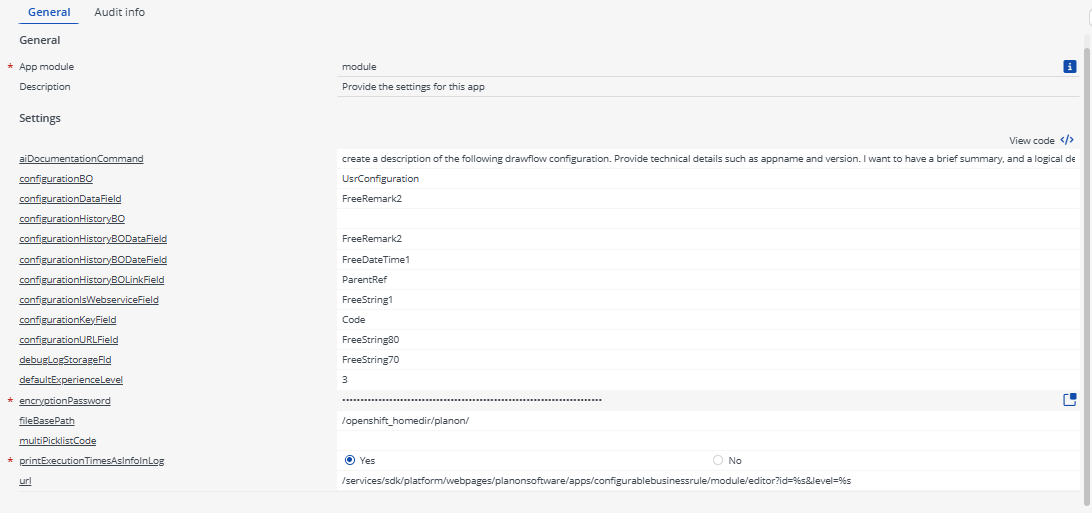
Now that the app is installed, the app settings can be provided for each module in the ‘modules’ selection level. Provide the module settings (the app configuration), which are available in the Details section.
Click the Save button after providing the module settings.
Description of settings
| Setting | Values | Description |
|---|---|---|
| aiDocumentationCommand | String | Text to generate AI command for creating documentation. |
| configurationBO | String | Systemname of used (free) module which will be used to store the configurations. |
| configurationDataField | String | Actual datafield in (free) module to store the configuration JSON from the visual editor. Recommended is to use an ExtendedString field here because the configurations can get large. |
| configurationHistoryBO | String | Systemname of (UD)BO which will be used to store each history version while saving. |
| configurationHistoryBODataField | String | Actual datafield in (free) module to store the history version configuration JSON from the visual editor. Recommended is to use a ExtendedString field here because the configurations can get large. |
| configurationHistoryBODateField | String | Datefield which will contain the timestamp of the history record. |
| configurationHistoryBOLinkField | String | Linkfield to the actual configuration. |
| configurationIsWebserviceField | String | Fieldname of yes/no picklist field to determine the configuration is used for an incoming webservice. |
| configurationKeyField | String | Keyfield of the (free) module. This field will hold the unique ID of the configuration which the businessrule configuration can use for execution. |
| configurationUrlField | String | Systemname of field which will hold the auto-generated url to the visual editor pointing to that specific configuration. |
| debugLogStorageField | String | Fieldname of document field which will hold the debug information. Once this setting is provided a debug button will be visible in the editor. After clicking the button the debug information of the last run will be shown in the editor. See Debugging for more information. |
| defaultExperienceLevel | String | Default experiencelevel which will be part of the generated url. |
| encryptionPassword | String | Encryption password which will be used to encrypt/decrypt passwords in the configurations. |
| fileBasePath | String | Base filepath which will be used for references to files. |
| multiPicklistCode | String | Code configuration which will be executed after adding or deleting a multipicklist. In the configuration it is possible to check the action and multipicklist type. This is because it is not possible to register a businessrule on those (UD)BO’s in Planon. |
| printExecutionTimesAsInfoInLog | String | If this option is enabled the execution times will be showed in the Wildfly/Tomcat logs to monitor delays. |
| url | String | Default URL template which will be generated for each configuration. |
Example settings