Building logic flows
Functions
Each function has its own purpose and logic. The description gives a brief explanation about the logic and the manual can be consulted for more information.
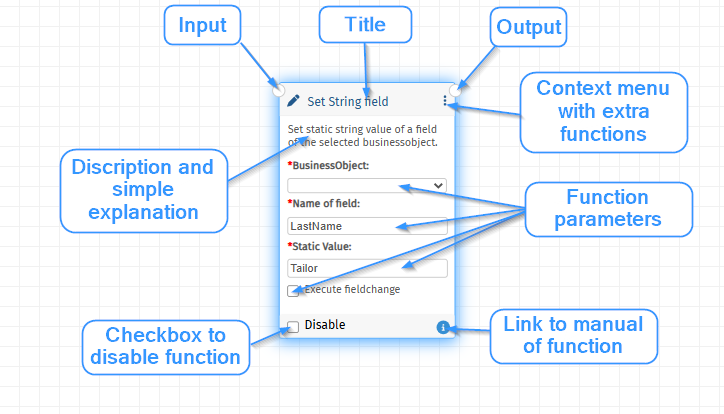
The following parts can be distinguished within a basic function:
Start of flow
Each flow will always start with the “Start of flow” node. This special node has several parameters:
- App version: shows the saved version of the configuration.
- Function size: selects the view-type of the functions.
- Full: show full-size functions with all editable fields.
- Simple: show a summary of all selected values.
- Small: show only the title of the function.
Full
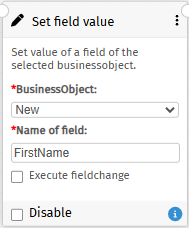
Simple
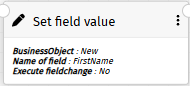
Small

Processing order
The flow execution of the functions is from left to right and top-down.
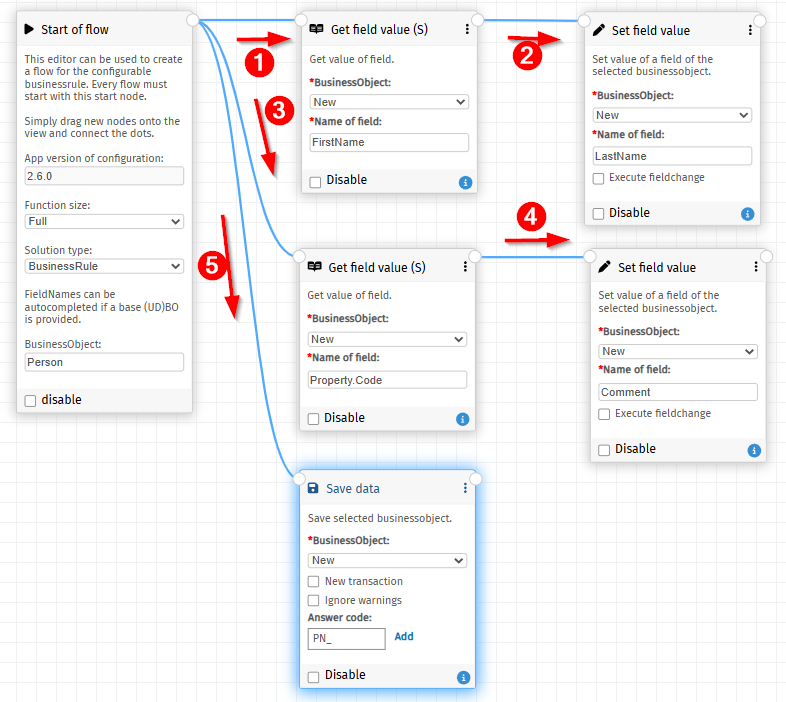
Note: each connection will be executed, which means duplicate connections between functions will also result in double executions. The following example shows that the person will be saved twice, which is not intended:
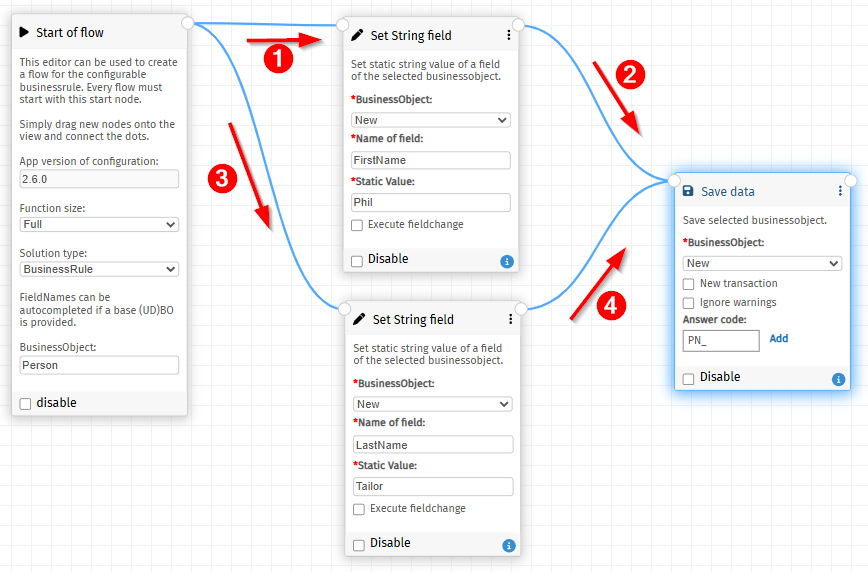
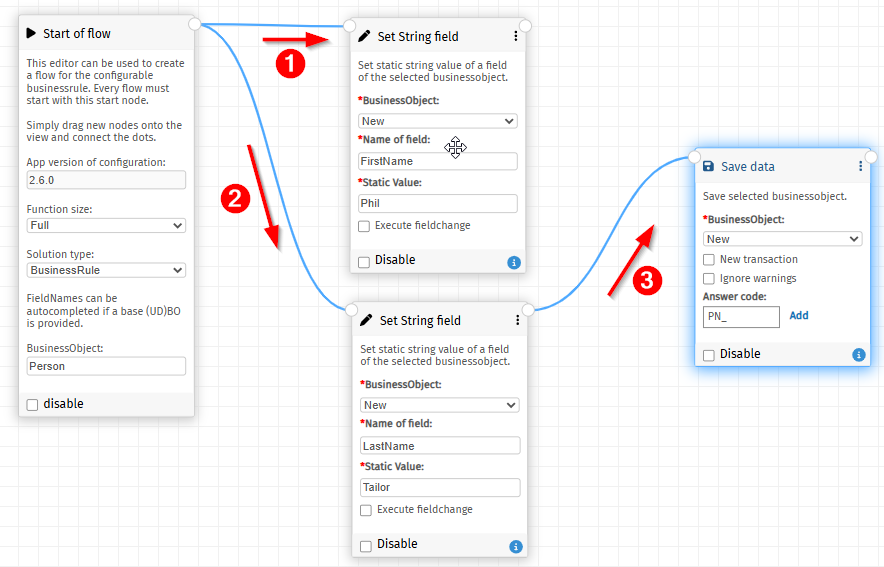
There are 2 possibilities to make this work. Remove the top connection, because the save must be executed after the update of the second field:
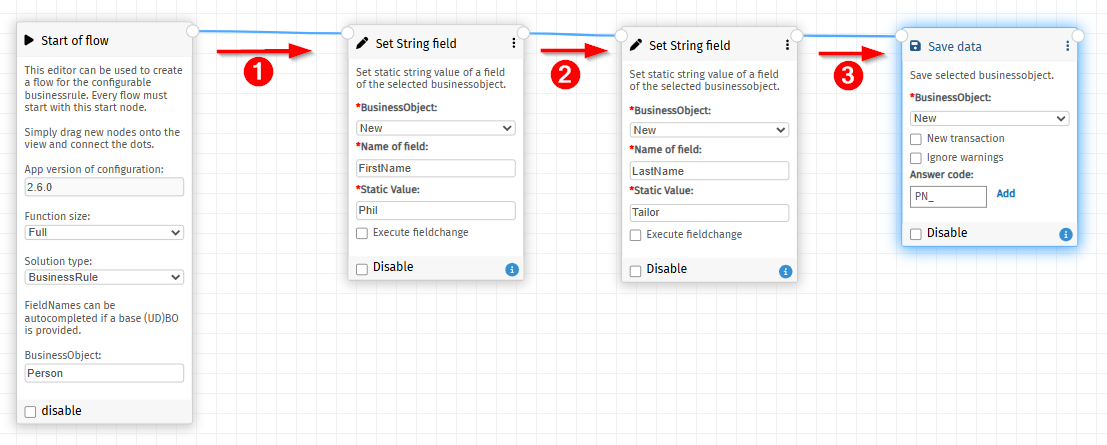
Or connect all functions in a sequence:
As indicated, the order of execution is determined top-down by the position of the sub-function as seen from the current function. This is illustrated in the following example:
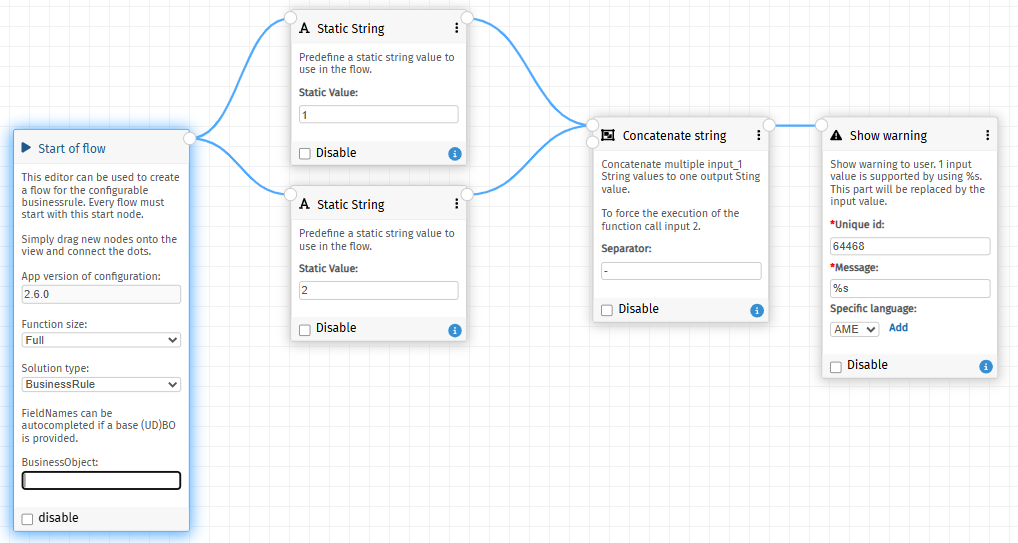
Start of flow will check which subfunction is on top. In this case value 1, so the output here will be “1-2”.
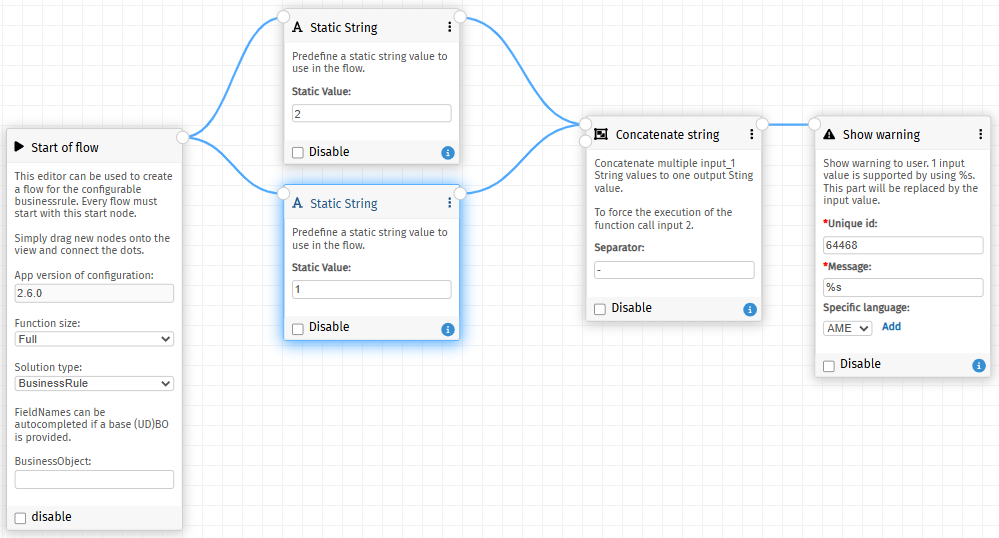
In this example, value 2 is on top, so the output will be “2-1”.
Collector functions
Some functions have multiple inputs. Those functions are called collector functions because they can have an unlimited amount of input connections on input 1.
The following function is an AND function, as an example, which can have 1 or more input booleans on input 1. If all input values are TRUE, output 1 will be called. In all other cases output 2 will be called.
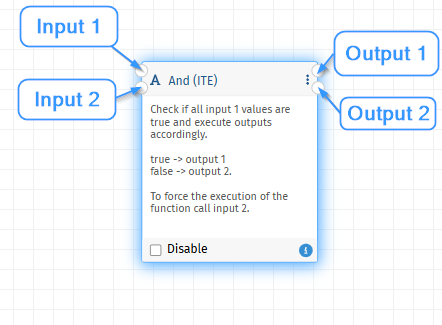
Input 2 can be manually called to force the execution of the function. See Processing order for the order in which functions are executed.
Collector functions are used to collect multiple inputs and combine them into an output value. The system gathers input values on input 1 and when all logic has been executed, all collector functions are executed automatically by the Start of flow function.
The following example combines several fields to one output field Email and illustrates a flow which goes wrong. FirstName = “Steve”, LastName = “Weller”
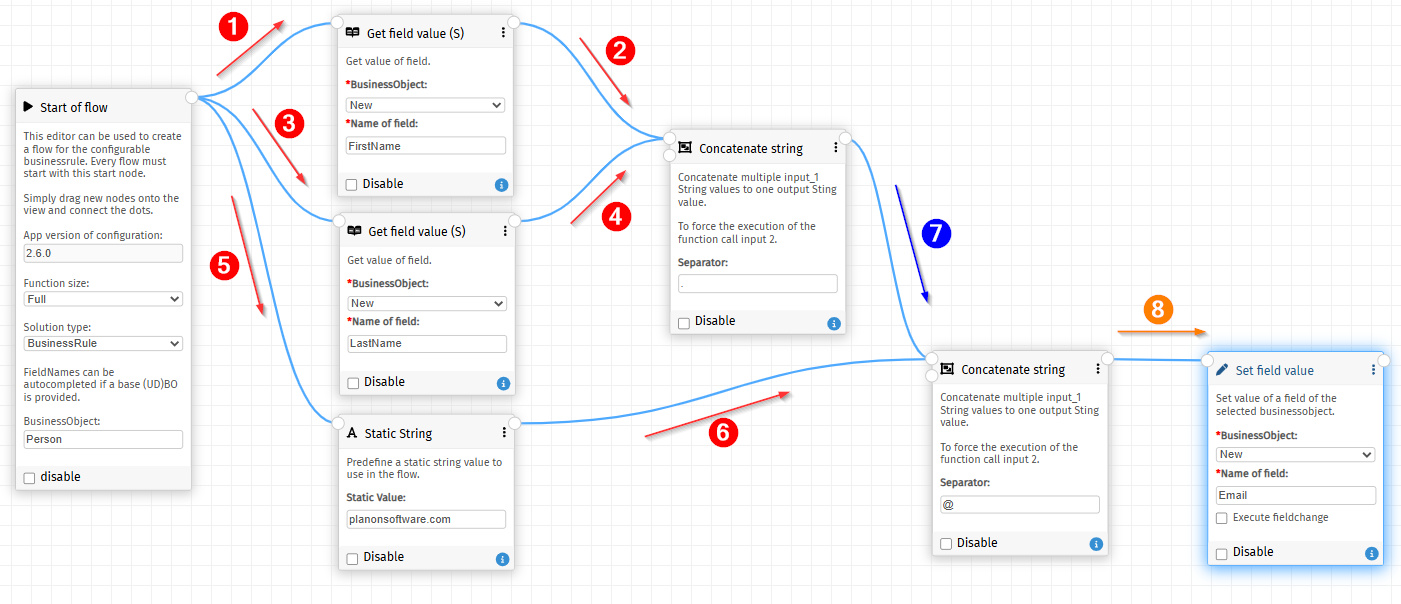
- As shown above, steps 1,2,3 and 4 will provide inputs to the first concatenate function. Because this is a Collector function, and no force execute is performed on input 2, the function will wait until all steps are executed.
- Next steps are 5 and 6 which will result in adding “planonsoftware.com” to the second concatenate function first. Because no force execute is done on input 2 also this concatenate will wait until all steps are being executed. Note that this collector functions is second in line because the first concatenate function is already waiting.
- No steps are left to be executed because the 2 concatenate functions are waiting. The system will now execute all waiting functions:
- first execute concatenate 1, which will combine “Steve” and “Weller” to “Steve.Weller”. This value is send to the next concatenate function (step 7)
- second execute concatenate 2, which will combine the values “planonsoftware.com” and “Steve.Weller” to “planonsoftware.com@Steve.Weller”. This calue is send to the next function (step 8).
The outcome is wrong in this case.
To solve this problem an input 2 is available. This input can be executed manually so it is possible to force the correct order of executions. Example:
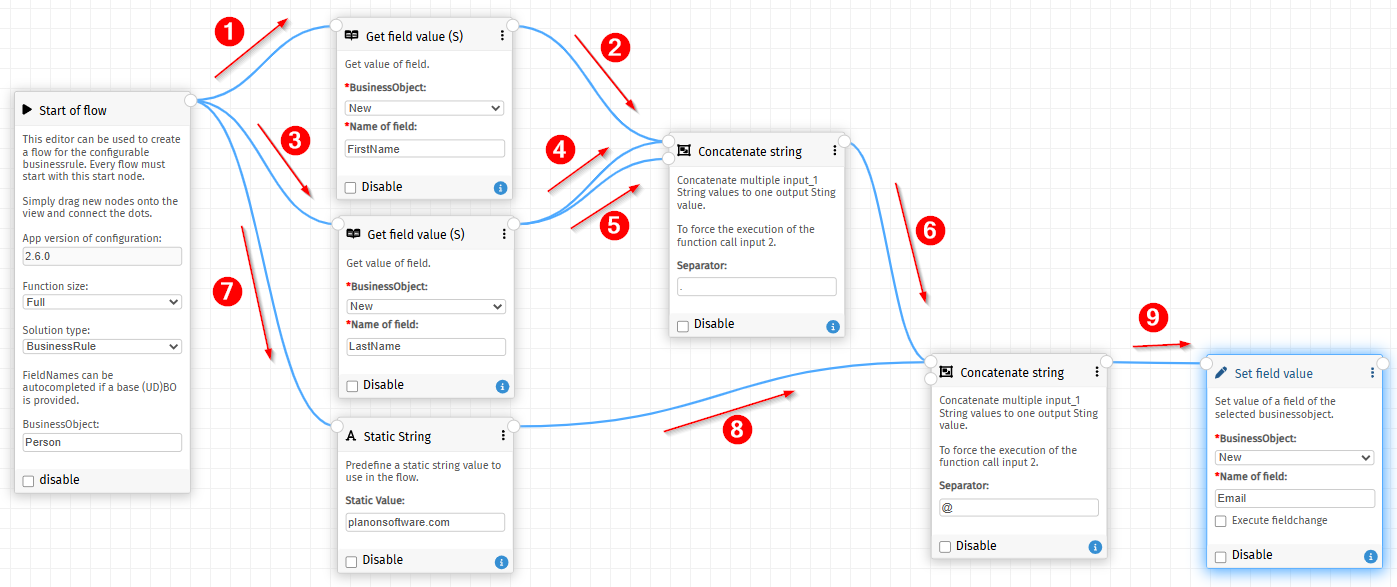
- As shown above, steps 1,2,3 and 4 will provide inputs to the first concatenate function.
- Step 5 will force the concatenate function to execute. The output combined “Steve.Wellet” will be send to the next concatenate (**Step 6)
- Steps 7 and 8 will provide “planonsoftware.com” to the dsNo steps are left to be executed because the 2 concatenate functions are waiting. The system will now execute all waiting functions:
- No steps are left to be executed because the 2 concatenate functions are waiting. The system will now execute all waiting functions:
- Executing the second concatenate function will result in combining “Steve.Weller” and “planonsoftware.com” to “Steve.Weller@planonsoftware.com”. This value will be send to the next function (Step 9)
It is also possible to have another connection (Green arrow) to force the execution of the second concatenate function.
Best practice is to always connect the second input of a collector function to make it controllable and prevent creating “unexplainable” logic. Make sure to connect it to one of the previous functions when all inputs are being provided.
Convenience functions
Each function has its own (mostly) simple task. In configurations some combinations of functions are frequently used. To prevent the unnecessary adding of all those functions, convenience functions are introduced. Those functions are most of the time marked:
- (S): Static version of the function. A direct parameter function is added to the function so it can be provided directly.
- (ITE): Those functions already include an if-then-else function. If the outcome of the base version is true, output 1 will be called and otherwise output 2.
The following example flows are identical in outcome but will show the difference between simple and the more advanced convenience functions:
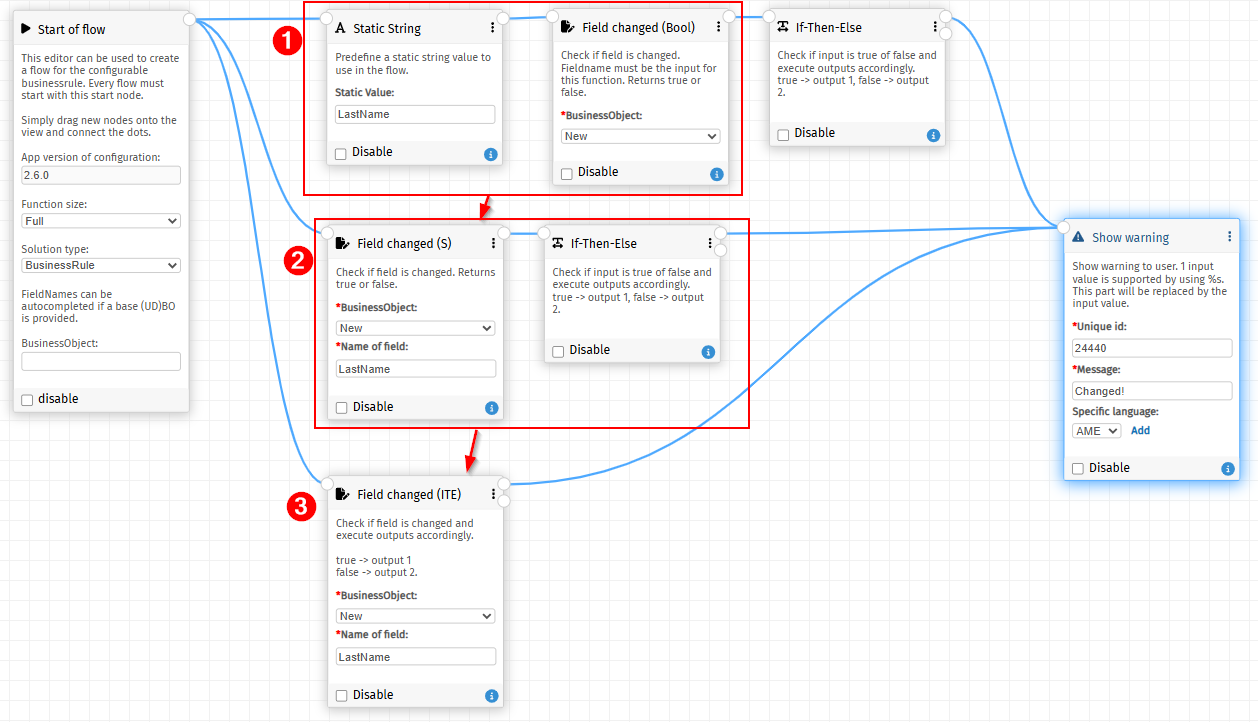
- Flow 1 is basic. 3 functions are needed to check if LastName is changed and, if that is the case, show the warning.
- Flow 2 has 2 functions (Static String & Field changed) of flow 1 combined in 1 convenience function (Field changed (S)).
- Flow 3 has only 1 function which combines Field changed (S) and if-then-else.