Webservice
Webservice general information
A Webservice configuration makes it possible to exchange data between Planon and external systems without writing Java code. The logic is built in the same visual editor as a Business Rule, but instead of reacting on a save of a BusinessObject (BO) it reacts on a web service call.
For more general information about web services in Planon please visit: https://webhelp.planoncloud.com/en/Application%20Management/c_appmgmt_webservices.html
Logic Flow Builder supports two webservice solution types:
- Incoming webservice: handles logic triggered by an incoming web service request from an external system.
- Webservice response: processes the response when an external web service is called from a Logic Flow Builder configuration.
Source and Target
In a webservice solution the data objects have a different meaning than in a Business Rule:
- Request is the source data which can be read. It holds the incoming data (body, headers, method) sent by the calling system.
- Response is the target data which can be written. Everything set on Target is returned to the calling system, including the HTTP code.
The following statements are true:
- Values are read from Source and written to Target. Changing values of Source has no effect on the response.
- Planon BusinessObjects that are created or changed in the flow (for example via Create businessobject or Find by lookup) are not saved automatically. This must explicitly be done by adding a save function.
- When no HTTP code is set, the default HTTP code (200) is returned. Use Set HTTP Code to return a specific code, for example 400 (bad request) or 404 (not found) in error situations.
Configuration
The webservice solution types are only available from experience level 3 (Expert).
- Create a new configuration in the free module. Provide a Code and a Name / Description and save. See Planon configuration.
- Open the editor via the link button and click on “expert” (level 3) in the left menu.
- On the Start of flow node set the Solution type to Incoming webservice (or Webservice response when processing the response of an outgoing call).
- Build the logic: read the request values from Source and write the response values to Target.
- Add explicit save functions for every Planon BusinessObject that is created or changed.
- Save the configuration.
Note: Webservices are not available in the standalone version. A free module configuration is required.
Incoming Webservice (Synchronous)
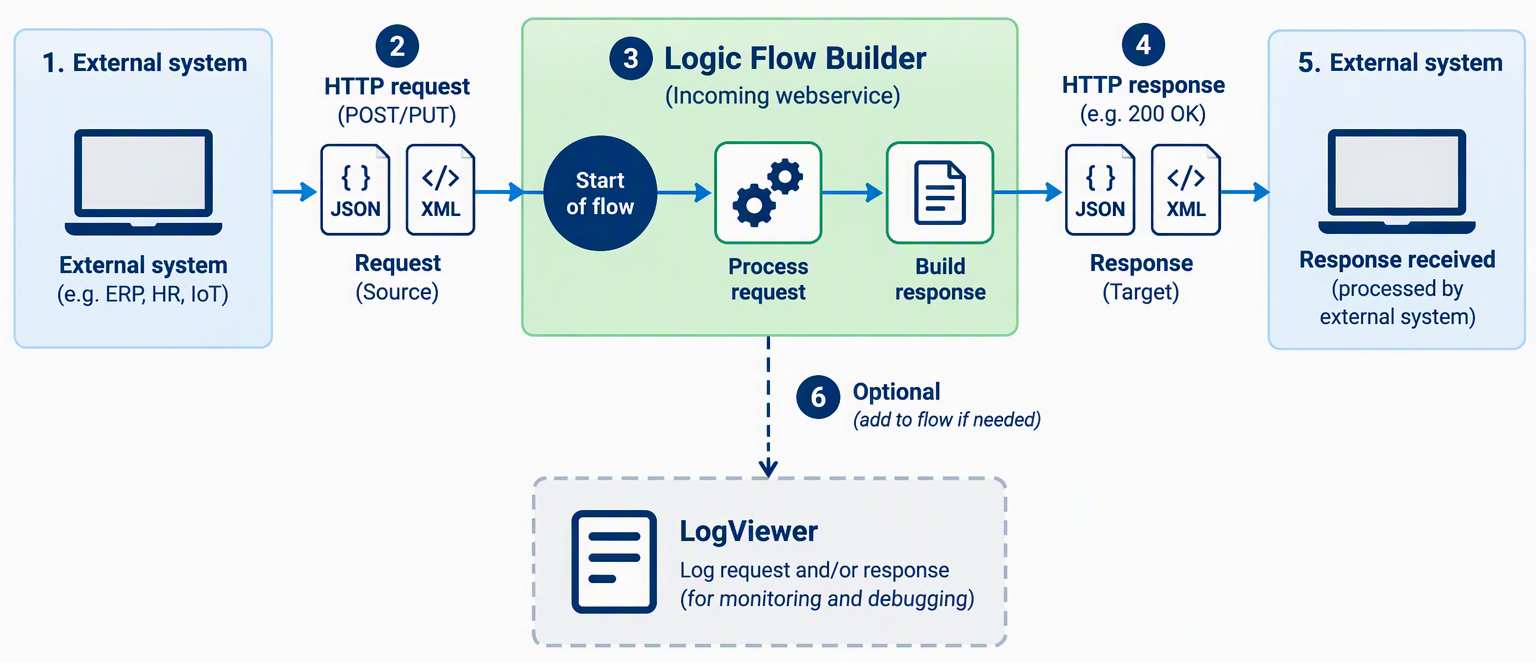
This is the simplest way to handle an incoming message.
- External system will call the endpoint https://{environment}/services/sdk/platform/jaxrs/planonsoftware/apps/configurablebusinessrule/module/endpoint/{configID}
- JSON or XML message will be received.
- LFB configuration will be executed and will process incoming data. Result data can be provided in the response.
- JSON or XML message will be send back.
- External system will receive the response.
- Optionally a log record can be added to the logviewer. This is part of the LFB configuration.
Incoming Webservice (EventConnector / A-Synchronous)
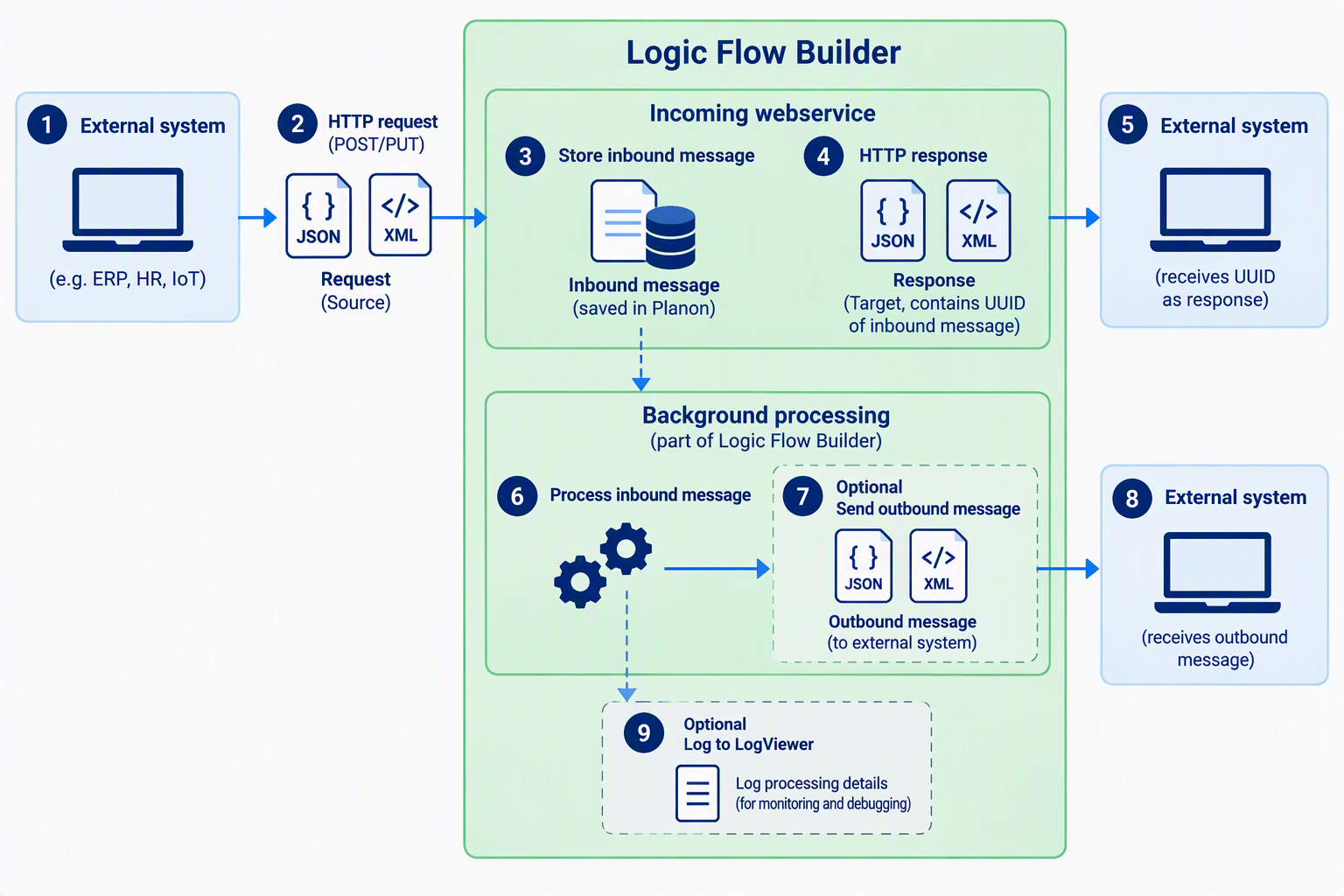
- External system will call the endpoint https://{environment}/services/sdk/platform/jaxrs/planonsoftware/apps/configurablebusinessrule/module/endpointec/{configID}
- JSON or XML message will be received.
- LFB will register incoming message in the Inbound message queue of the eventconnector.
- JSON or XML message will be send back containing the UUID of the new inbound message.
- External system will receive the UUID response.
- The EventConnector will handle the Inbound message and execute the LFB configuration which will process the message.
- Optionally a new outbound message will be send from the LFB configuration to the external system
- Optionally the log will be added to the logviewer.
Response Webservice (EventConnector / A-Synchronous)
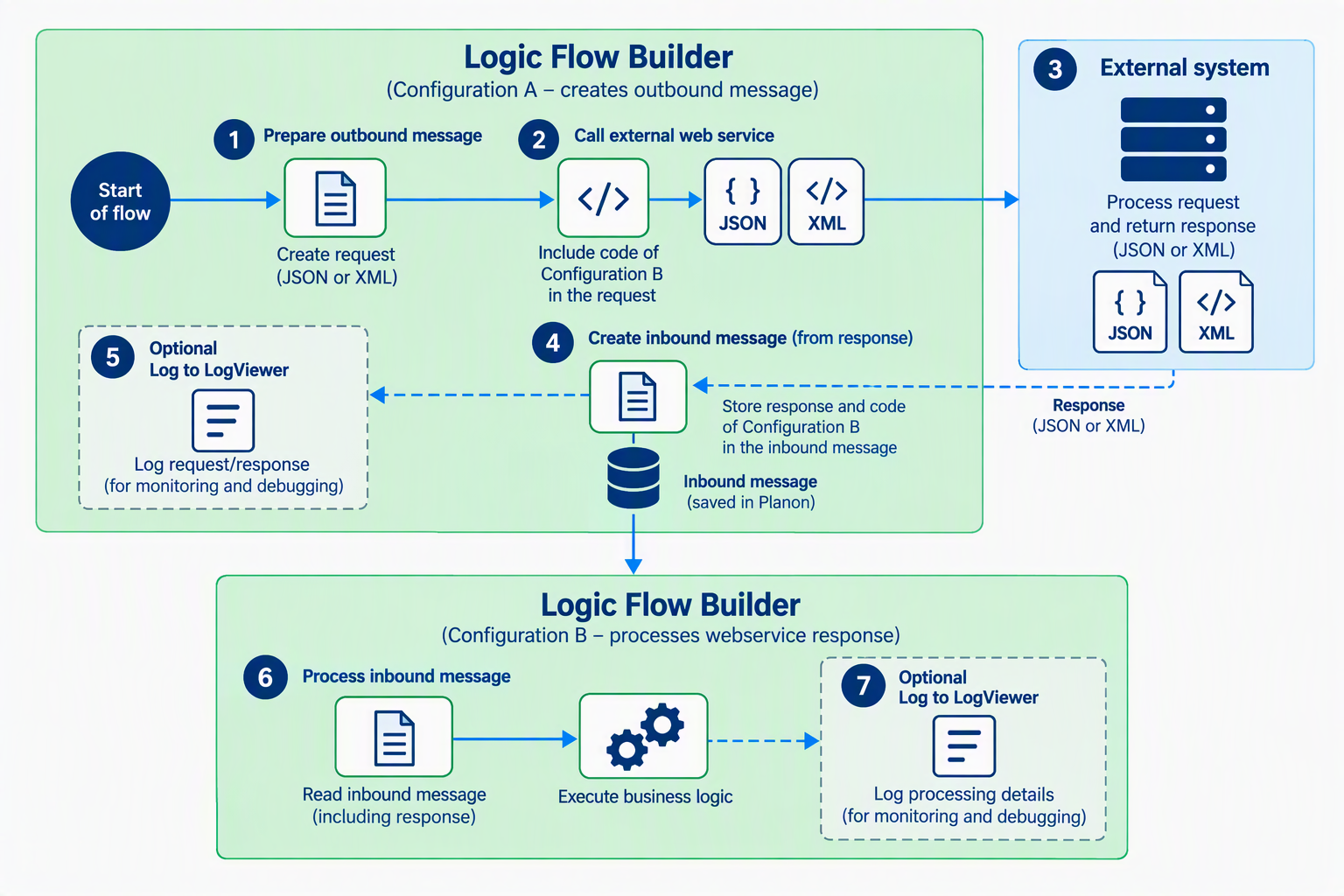
- Construct message based on data in Planon in configuration A
- Call external webservice with the code of the Response configuration B as a parameter
- External system will process the call and respond.
- Response will be added to the eventconnecter as an inbound message. Configuration code ‘B’ is stored in the inbound message as well.
- Optionally add log record to eventlog.
- The EventConnector will handle the Inbound message and execute the LFB configuration based on code ‘B’ which will process the inbound message (Note: this is actually the response of the call)
- Optionally add log record to eventlog.
Logging and debugging
It is recommended to log the incoming request and the outgoing response with Add to LogViewer. Use a recognizable source per integration (for example <NAME>_WEBSERVICE_REQUEST and <NAME>_WEBSERVICE_RESPONSE) so payloads can easily be found in the LogViewer.
Log error situations with level ERROR together with the HTTP code that is returned.
Licensing
Each unique configuration marked as webservice counts as 1 license. The license usage is visible on the License usage tab of the in-app manual.