How does it work
This chapter contains the functional and technical description of the solutions proposed.
This app calls the Mobiess endpoint as described on the following URL; https://customer.mobiess.com/svc/metadata
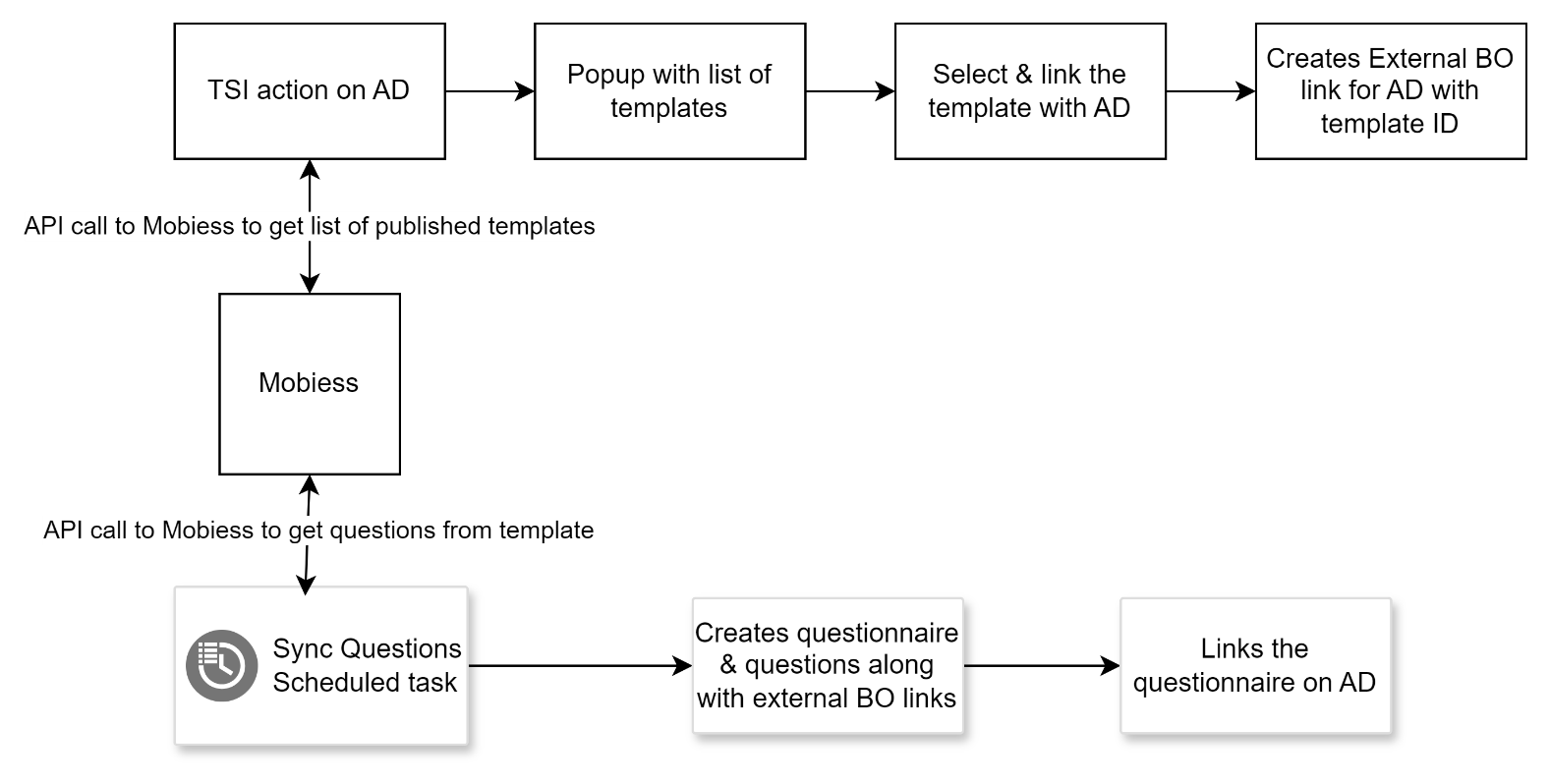
Linking existing Templates to assessment definition
There is a TSI action created and configured on Assessment definition. When user select an assessment definition and clicks on this action, a popup will appear which has the list of all Published Templates from Mobiess. From the list user has to select a template to be linked with the selected Assessment Definition and click on the Link button. This will create a mapping(External BO Link) between the Assessment Definition and Template.
Component type : TSI Action Component name : planonsoftware.apps.mobiess.connector.tsiaction.LinkMobiessTemplate
Import questionnaire and questions
This app contains a scheduled task that executes based on the configured time interval.
It looks for all the assessment definitions in Planon that don’t have a questionnaire linked and are also synced with Mobiess
For each assessment definition it checks for corresponding survey templates which have been published in Mobiess
If yes, then read all the questions linked with that survey template and create questionnaire and questions. Also link the questionnaire to the corresponding assessment definition
ExternalBoLinks will be created for questions & questionnaire created by Planon
Technical details
| Planon BO | Field systemname | Mobiess API get Questions | Comments |
|---|---|---|---|
| Questionnaire | Code | Planon generated code | |
| Questionnaire | Name | Assessment Definition.Description from Planon | |
| Questionnaire | QuestionnaireUsage | A, Do not use in PMFS | |
| Questionnaire | IsAudit | Always “False” for now | |
| Questionnaire External BO Link | External ID | Base 64 encoded value of SurveyTemplate.Id | |
| Question | Code | “MOB”+Auto genrated random number | |
| Question | Name | Label | |
| Question | IsMandatory | Always false | |
| Question | SysSystemType | Template | Refer below for question types supported and mapping details |
| Question | QuestionAlias | Code or Name | Either Code or Name of the question is used based on the configuration |
| Question External BO Link | External ID | Id | |
| Assessment Definition | QuestionnaireRef | Questionnaire which is being created will be mapped |
Question types from Mobiess to Planon:
| Mobiess question type | Mobiess question template value | Planon Question Type |
|---|---|---|
| Textbox | Txt | TextQuestion |
| Date | Date | DateQuestion |
| Number | Num | IntegerQuestion |
| Time | Time | TimeQuestion |
| TextArea | TxtA | MemoQuestion |
| Slider | Sld | IntegerQuestion |
| Barcode | Scan | TextQuestion |
| Hidden | Hidden | TextQuestion (Only when there is Code is empty or Code doesn’t match with System name of any of the Assessment BO fields and Question code doesn’t start with prefix) |
| Link | Link | Not Supported |
| Repeat | Repeat | Not Supported |
| Multiple Choice | RadH | SingleSelectQuestion |
| Multiple Choice | RadV | SingleSelectQuestion |
| Checkbox | Chk | SingleSelectQuestion |
| Signature | Picture | Communication Log BO as per configuration |
| Sketch | Picture | Communication Log BO as per configuration |
| Photo | Picture | Communication Log BO as per configuration |
| ListPicker | ListPicker | MultiSelectQuestion / SingleSelectQuestion / As Assessment or Observation field if question code matches and type is Data Driven |
| GPSLocation | Location | TextQuestion |
| ButtonSet | ButtonSet | Not Supported |
| Button | Button | Not Supported |
Note:
- All child questions under a repeater are ignored while synchronizing the questions.
- Any question of type Number are created as Integer questions in Planon.
Data Driven Questions
Till version 1.11.0, List picker questions of type Data Driven are never created as questions.
From version 1.12.0, List picker questions of type Data Driven questions are also created as questions only if Mobiess question code is empty or doesn’t match with system name of the fields on Assessment BO. Also it should satisfy following criteria
Table used on the question must be LookUp. If any other table is configured, the question will be skipped.
The question must also have either Primary or Secondary Filter configured and also should have atleast 1 answer option available with the configured filter criteria.
Component type : Schedule Task Compoennt name : planonsoftware.apps.mobiess.connector.scheduletask.SyncQuestions
Flow chart for features 4.1 & 4.2
Pushing Work Orders
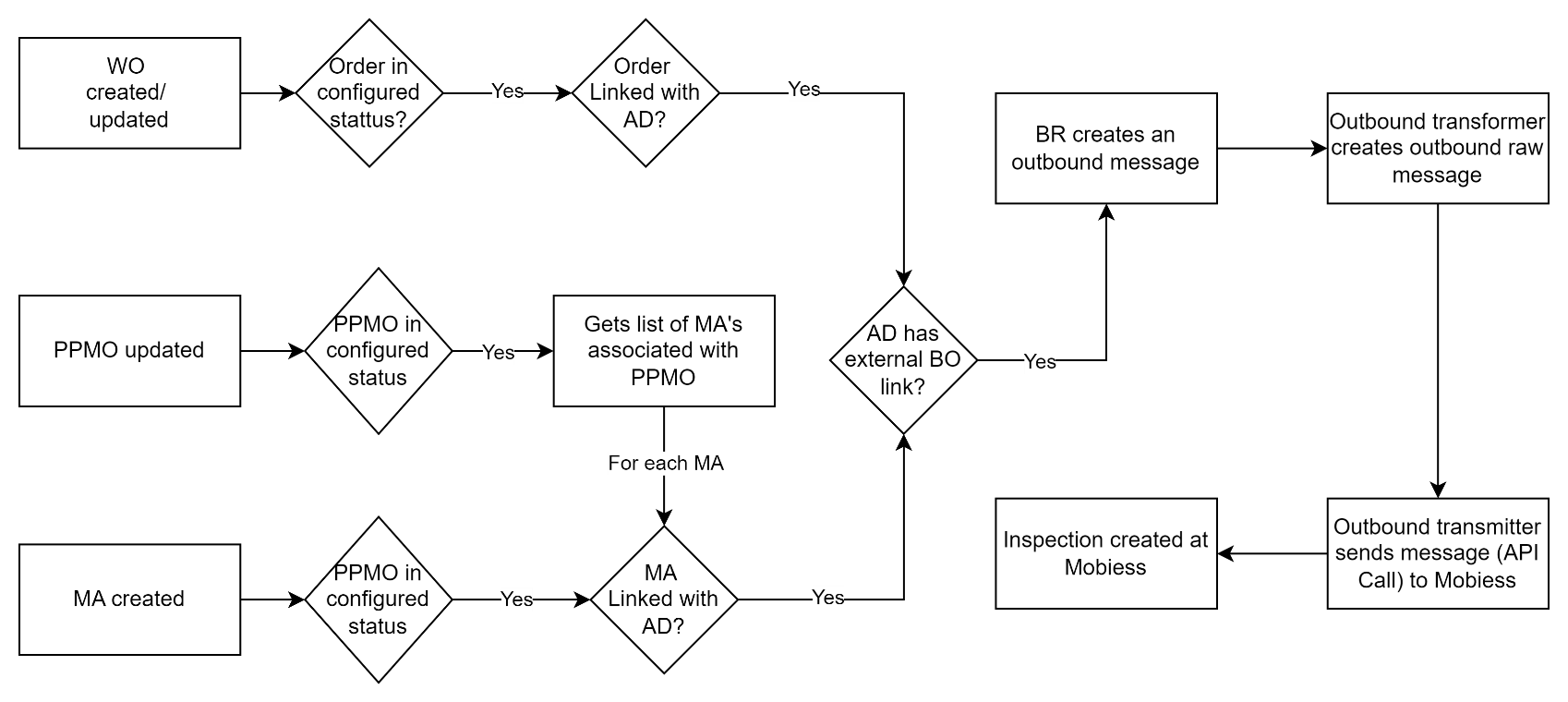
A Business Rule is created, registered on the WorkOrder BO, that triggers whenever a new order is created/updated, linked with an Assessment Definition which is already available in Mobiess and order is in configured state
It creates an outbound message with the order details
A Outbound Transformer is created to transform the message to outbound raw message
A Outbound Transmitter will send the transformed message and a survey header will be created in Mobiess system
Technical details
| Planon BO | Field systemname | Mobiess API Create Survey Header | Comments |
|---|---|---|---|
| WorkOrder | OrderNumber | ExternalId | |
| WorkOrder | OrderNumber , Description , <BeginDateTime> | Name | The datetime to be shown is configurable for each order type using the setting “dateTimeField”. The format shown is dd-MMM-yyyy |
| WorkOrder | PropertyRef.Code – PropertyRef.Name / Address / HouseNumber / Postal Code / City / District / Country | Location | |
| WorkOrder | AssessmentDefinitionRef [ExternalBoLink.ExternalId] | SurveyTemplateId | ExternalId of ExternalBoLink corresponds to linked assessment definition |
| WorkOrder | AssessmentDefinitionRef.Description | TemplateName | assessment definition |
| WorkOrder | InternalTradesmanPersonRef.Email | User | |
| Created | Value of CurrentTimestamp | ||
| WorkOrder | PropertyRef.Code-PropertyRef.Name / SpaceRef.Code-SpaceRef.Name / InventoryItemRef.Code-InventoryItemRef.Name / Comments | Notes | Refer section 4.3.2 |
| WorkOrder | Lattitude Value from PropertyRef. Location | Lattitude | |
| WorkOrder | Longitude Value from PropertyRef. Location | Longitude | |
| WorkOrder | <BeginDateTime> | Scheduled | The datetime to be shown is configurable for each order type using the setting “dateTimeField”. The format shown is dd MMM yyyy |
From version 1.10.0, along with above data, we also send HeaderConfig section with contains below data. This section basically contains the readonly fields and default answers for the questions with name “DateOfInspection” & “PropertyNumber”
Below is the HeaderConfig
“HeaderConfig”: “{ ‘readOnlyFields’: [ ‘SurveyNumber’, ‘Name’, ‘Location’, ‘Scheduled’ ], ’externalAnswers’: [ { ‘Name’: ‘PropertyNumber’, ‘Value’: ‘<PropertyRef.Code>’ }, { ‘Name’: ‘DateofInspection’, ‘Value’: ‘<Value of the Inspection Date field from the Order or MA>’ } ] }”
Component Type : Business Rule Components Name : planonsoftware.apps.mobiess.connector.businessrule.WorkOrderSurveyHeaderRule
Mobiess Configuration Details
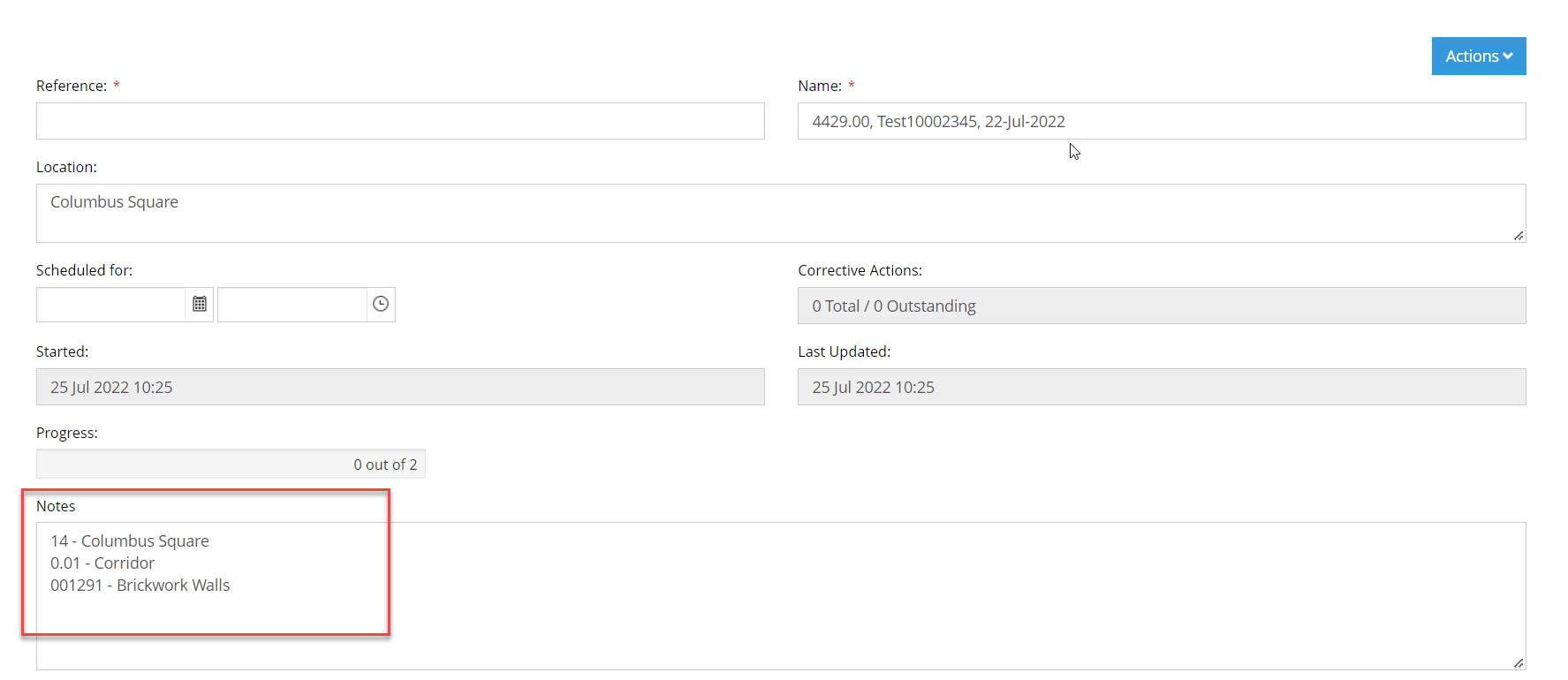
To add more details on an Inspection created in Mobiess driven by Planon WorkOrder or Maintenance Activity, we are using Notes field which is availble on the Survey Header details page of an inspection or survey header.
Instructions for enabling Survey Header Details page in Mobiess
Login to Mobiess webapp with admin console and navigate to Templates section
Select the corresponding template and click Edit button. You will be having an option to configure Template Properties
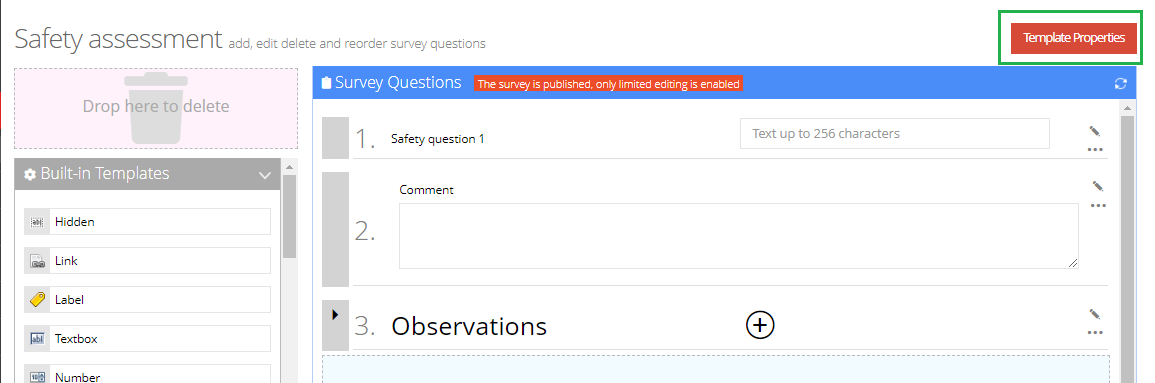
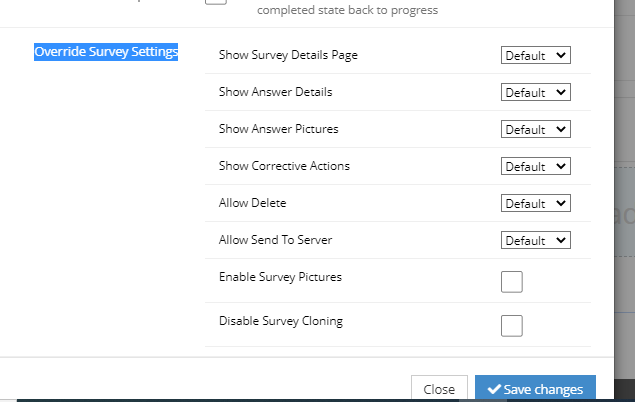
- Click on Template Properties and under Override Survey Settings make sure to set Survey Details Page setting to Enable or Default and save the changes.
- While editing an inspection, it will show Survey Header Details page and we can see Notes field here.
Pushing Maintenance Activities
A Business Rule is created, registered on the Maintenance Activity BO, that triggers whenever a new MA is created and linked with an Assessment Definition which is already available in Mobiess.
It creates an outbound message with the MA and its order details
A Outbound Transformer is created to transform the message to outbound raw message
A Outbound Transmitter will send the transformed message and a survey header will be created in Mobiess system
Technical details
| Planon BO | Field systemname | Mobiess API Create Survey Header | Comments |
|---|---|---|---|
| MaintenanceActivity | Code, Syscode | ExternalId | “MA_"+Code+”_"+Syscode |
| MaintenanceActivity | OrderRef.OrderNumber , Name , <StartDateTime> | Name | The datetime to be shown is configurable for each order type using the setting “dateTimeField”. The format shown is dd-MMM-yyyy |
| MaintenanceActivity | PropertyRef.Code – PropertyRef.Name / Address / HouseNumber / Postal Code / City / District / Country | Location | |
| MaintenanceActivity | AssessmentDefinitionRef [ExternalBoLink.ExternalId] | SurveyTemplateId | ExternalId of ExternalBoLink corresponds to linked assessment definition |
| MaintenanceActivity | AssessmentDefinitionRef.Description | TemplateName | assessment definition |
| MaintenanceActivity | OrderRef.InternalTradesmanPersonRef.Email | User | |
| Created | Value of CurrentTimestamp | ||
| MaintenanceActivity | PropertyRef.Code-PropertyRef.Name / SpaceRef.Code-SpaceRef.Name / AssetRef.Code-AssetRef.Name / Comments | Notes | Refer section 4.3.2 for more details |
| MaintenanceActivity | Lattitude Value from PropertyRef. Location | Lattitude | |
| MaintenanceActivity | Longitude Value from PropertyRef. Location | Longitude | |
| MaintenanceActivity | < StartDateTime > | Scheduled | The datetime to be shown is configurable for each order type using the setting “dateTimeField”. The format shown is dd MMM yyyy |
Component type : Business Rule Components Name :
- planonsoftware.apps.mobiess.connector.businessrule.MaintenanceActivitySurveyHeaderRule
- planonsoftware.apps.mobiess.connector.businessrule.PPMOrderSurveyHeaderRule
Flow chart
Importing Assessments and Assessment results
Assessment results can be imported into Planon in the following ways::
When Order status is TechnicallyCompleted
When Maintenanace Activity status is Completed
Based on a schedule
When Order status is Technically Completed:
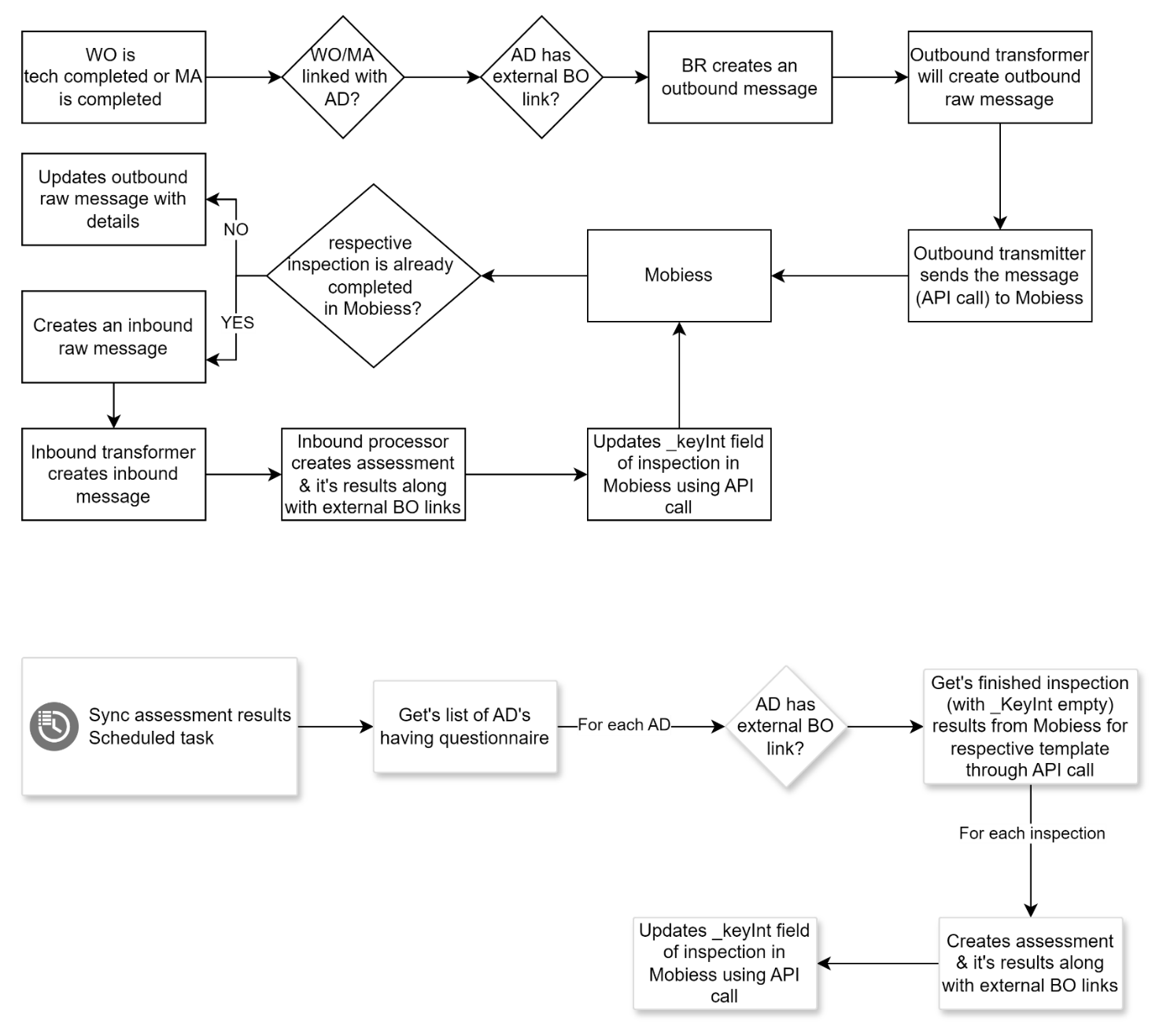
When the order is technically completed and linked with a assessment definition that has questionnaire linked then there is a Business Rule that looks for the corresponding survey header in Mobiess based on the survey template id (AssessmentDefinition[ExternalBoLink.ExternalId]) and ExternalId (WorkOrder.OrderNumber) and if it’s already in completed status then it imports the results into Planon.
Business Rule creates an outbound message
Outbound Transformer will transform the message into outbound raw message
Outbound Transmitter will send the raw message to Mobiess
Based on the response from Mobiess it creates a inbound raw message
Inbound Transformer will transform the raw message into inbound message
Inbound message will be processed by the Inbound processor, creates assessment and assessment results
ExternalBoLinks will be created for assessment & assessment results by Planon
It will update a field(_KeyInt) of survey header in Mobiess such that it will get skipped in next execution of scheduler(refer 4.5.3).
Component Used : Business Rule Components Name : planonsoftware.apps.mobiess.connector.businessrule.AssessmentResultRule
When Maintenance Activity is Completed
When PPM Order is technically completed or Maintenance Activity is completed and linked with a assessment definition that has questionnaire linked then there is a Business Rule that looks for the corresponding survey header in Mobiess based on the survey template id(AssessmentDefinition[ExternalBoLink.ExternalId]) and ExternalId (MA_<MACode>_<MASyscode>) and if it’s already in completed status then it imports the results into Planon.
Business Rule creates an outbound message
Outbound Transformer will transform the message into outbound raw message
Outbound Transmitter will send the raw message to Mobiess
Based on the response from Mobiess it creates a inbound raw message
Inbound Transformer will transform the raw message into inbound message
Inbound message will be processed by the Inbound processor, creates assessment and assessment results
ExternalBoLinks will be created for assessment & assessment results by Planon
It will update a field(_KeyInt) of survey header in Mobiess such that it will get skipped in next execution of scheduler(refer 4.5.3).
Component type : Business Rule Components Name : planonsoftware.apps.mobiess.connector.businessrule.AssessmentResultRule
Based on a schedule:
The other way is by using a scheduled task that triggers based on the configured interval and looks for all the assessment definitions that are having questionnaire linked and synced with Mobiess. For each assessment definiton it checks if it has any completed survey headers with field _KeyInt not updated by Planon and import them into Planon as assessment & assessment results. ExternalBoLinks will be created for assessment & assessment results in Planon and field _KeyInt of survey header will gets updated in Mobiess such that it will get skipped in next schedule.
After the import of order driven inspections into Planon, the order is now to set to completed state if it is not completed already and corresponding status transition is available as per the mapping in settings
From version 1.9.0, after the import of MA driven inspection into Planon, the MA is set to completed if it is not completed already and corresponding status transition is available as per the mapping in settings. Also if all MAs of the corresponding PPM Order are completed, PPM Order is set to completed if status transition is available as per the mapping in settings
Component Used : Schedule Task Components Name : planonsoftware.apps.mobiess.connector.scheduletask.SyncAssessmentResults
Flow chart
Assessment and Answer lines
The type of assessment to be created is decided based on the following logic:
If the inspection or survey header has mapping for Property or Space or Asset fields, the assessment type will be decided if available
General Assessment will be created if there is no order linked to the survey header
Asset Assessment will be created when there is an order linked and if the asset field has a value
Space Assessment will be created when there is an order linked and if the space field has a value and asset field is empty
Property Assessment will be created when there is an order linked and if the property field has a value and space & asset fields are empty
Technical Details
| Planon BO | Field systemname | Mobiess API get Survey Header & SurveyAnswer | Comments |
|---|---|---|---|
| Assessment | Assessment date-time | SurveyHeader.Completed | |
| Assessment | Code | “MOB”+Auto genrated random number | |
| Assessment | Description | SurveyHeader.Name | |
| Assessment | PersonRef | If SurveyHeader.ExternalId found then Order.InternalTradesmanPersonRef / Else Configured Person | |
| Assessment | WorkOrderRef | If SurveyHeader.ExternalId found then Order | SurveyHeader .ExternalId refers to Order number or Maintenace Activity in Planon |
| Assessment | MaintenanceActivityRef | If SurveyHeader.ExternalId found and its value starts with MA then Maintenace Acitivity | SurveyHeader .ExternalId refers to Order number or Maintenace Activity in Planon |
| Assessment | SpaceRef | If SurveyHeader.ExternalId found then Order.SpaceRef | SurveyHeader .ExternalId refers to Order number in Planon |
| Assessment | AssetRef | If SurveyHeader.ExternalId found then Order. InventoryItemRef | SurveyHeader .ExternalId refers to Order number in Planon |
| Assessment | PropertyRef | If SurveyHeader.ExternalId found then Order.PropertyRef | SurveyHeader .ExternalId refers to Order number in Planon |
| Assessment | AssessmentDefinitionRef | SurveyHeader.SurveyTemplateId | |
| Assessment | QuestionnaireRef | AssessmentDefinition.QuestionnaireRef | |
| Assessment External BO Link | External ID | SurveyHeader.Id | |
| AssessmentAnswerLine | QuestionRef | SurveyAnswer.SurveyQuestionId | |
| AssessmentAnswerLine | Answer | SurveyAnswer.Value | |
| AssessmentAnswerLine External BO Link | External ID | SurveyAnswer.Id |
Data Driven Questions as Assessment fields
Answers for the data driven questions are imported as the value for the field on the Assessment, Observation, Communication Log, Scoring and Followup Action Bos if question code matches with fields on the corresponding BO.
The mapping between the Data Driven question in Mobiess and Planon BO field is done as per the table selected and the code field value in the Data Driven question
The Code field value on the Data Driven Question maps to the corresponding reference field on the Planon BO.
Based on the table selected in the Data Driven Question, the corresponding lookup column data will be used to check if the record exist in Planon as per below sample mapping
Sample mapping
| Sample Question Code | Table | Lookup Column | Business Object | Lookup Field |
|---|---|---|---|---|
| PropertyRef | Building | Code | Property | Code |
| SpaceRef | Location | RoomNumber | Space | Code |
| AssetRef | Asset | Code | BaseAsset | Code |
| Lookup | Code | depends on Question Code | Lookup field of correspnding BO |
If Datadriven question code is empty or doesn’t match with any of the fields of Assessemt BO, then it looks for corresponding question and fills the answer. If there is no question found in Planon, then the answer will be skipped.
Note:
If the selected table on Data Driven Question does not have a Code column, then it is skipped
The Location table is handled with column RoomNumber only for Assessment and Observation level if question code matches SpaceRef
Observations
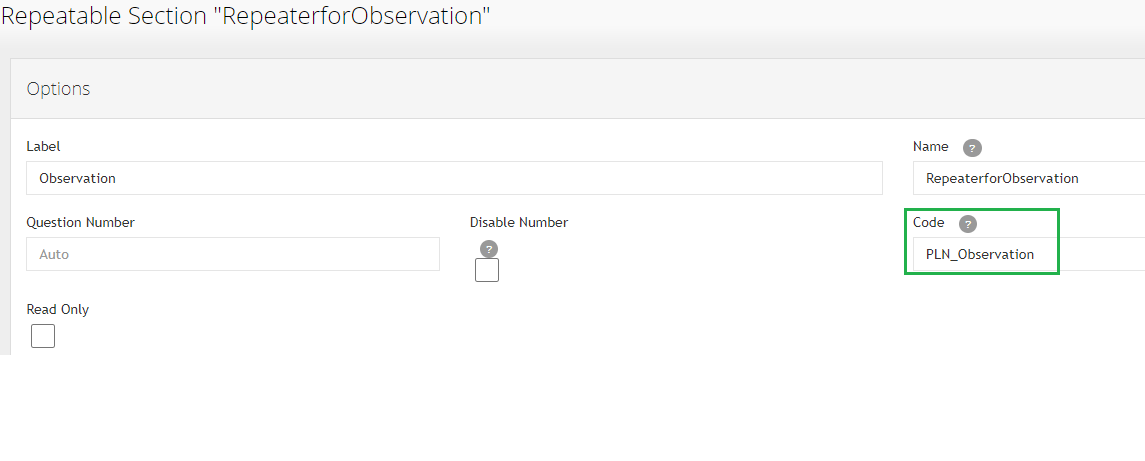
A repeater question which doesn’t have any parent and having code field value equal to “PLN_Observation” is considered as an Observation.
User can add n number of sub questions to this repeater.
An observation type is decided based on the questions from the observation. If any observation has a question related to Asset, Space, Property, then based on the answer for these questions, the observation type is decided. If there is no asset or space or property found in Planon matching with the answer for the observation question, then observation type is considered as the General Observation. If there is no answer for any of the Asset, Space and Property questions then assessment type is considered as the Observation type. It could be property/Space/Asset/Generic. Corresponding fields on the observation will be copied from it’s assessment like Property, Space & Asset.
Apart from the Assessment type, if there is any question related to Asset or Space or Property, the observation type is handled.
All the questions in the repeater having a code value with matching system names from observation fields of Planon will be considered and processed
Observation fields in Planon will be filled with corresponding answers from the survey header of Mobiess as per the mapping between questions in Mobiess and system names of Observation fields in Planon.
If the question code doesn’t match with any system name of observation fields in Planon then it’s answer will be skipped.
All the questions created under the repeater having code value “PLN_Observation” will be ignored while synchronizing the questionnaire & questions from Mobiess as this doesn’t require to do so and only answers from corresponding inspections are copied to Observation fields while synchronizing assessment results.
The questions and it’s types in the repeater should be matching with field types of Observation BO in Planon. Refer to the mapping table given below.
When there is no Description provided for observation, we are setting description to a default value ie “Default Observation Description”
Example: a Generic Observation in Planon contains fields like start date-time, Code, Description, Comment & Recommendation. Let’s understand how a repeater should look like in Mobiess to create Genenric Observation in Planon.
Repeater should be created with Code value “PLN_Observation”. This will be considered as an Observation BO in Planon.
A question of type ‘TextBox’ should be created under this repeater with Code value as “Description” and this question will be considered as mapping to the field with system name “Description” under Observation BO. Once the inspection is completed the answer for this question will be copied to the Description field on Observation.
Similarly user should create number of questions under this repeater as per their requirement but make sure that the question’s Code value in Mobiess matches with the Observation field system name in Planon such that all the answers for these questions will be copied to Planon Observation fields once inspection is completed.
Answer line Observation
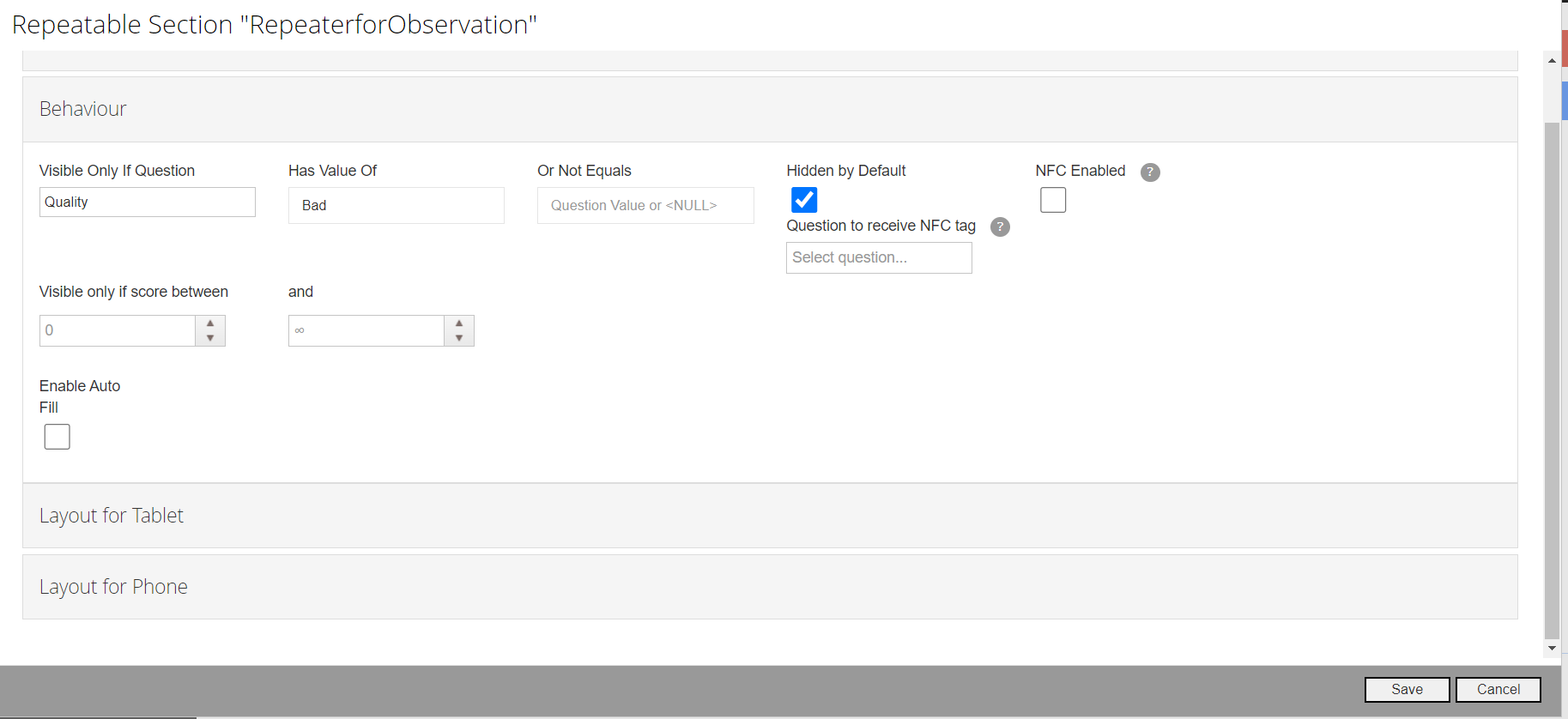
If we need to create an observation based on the specific answer of a question, this can be achieved by using behaviour section of Observation (Repeater question with code PLN_Observation). In behaviour section we can add settings such that observation is visible only when the answer of the other question in the template matches with configured value.
In Planon, App links the answer line of the corresponding question to the added observation.
Example: Please find the below screenshot of an observation question where it is dependent on the answer of other question
In this case, the observation will be visible only when the answer is “Bad” for the question “Quality”
Photos as Communication logs under observation
A repeater question with Code field value “PLN_CommunicationLog” under the repeater having code field value equal to “PLN_Observation” is considered as a CommunicationLog and created under corresponding Observation.
User can add n number of sub questions to this repeater
All the questions in repeater having code value with matching system names from CommunicationLog fields of Planon will be considered and processed
CommunicationLog fields in Planon will be filled with corresponding answers from survey header of Mobiess as per the mapping bewteen questions in Mobiess and system names of CommunicationLog fields in Planon.
If question code doesn’t match with any system name of CommunicationLog fields in Planon then it will be skipped.
The questions and it’s types in the repeater should be matching with field types of CommunicationLog BO in Planon. Refer to the mapping table given below.
Follow-up Action
A repeater question with Code field value “PLN_AssessmentAction” under the repeater having code field value equal to “PLN_Observation” is considered as a follow up action(BasicAssessmentAction) and created under corresponding Observation.
User can add n number of sub questions to this repeater
All the questions in repeater having code value with matching system names from BasicAssessmentAction fields of Planon will be considered and processed
BasicAssessmentAction fields in Planon will be filled with corresponding answers from survey header of Mobiess as per the mapping bewteen questions in Mobiess and system names of BasicAssessmentAction fields in Planon.
If question code doesn’t match with any system name of BasicAssessmentAction fields in Planon then it’ll be skipped.
The questions and it’s types in repeater should be matching with field types of BasicAssessmentAction BO in Planon. Refer to the mapping table given below.
Scoring
A repeater question with Code field value “PLN_TopicScore” under the repeater having code field value equal to “PLN_Observation” is considered as a scoring BO and created under corresponding Observation
User can add n number of sub questions to this repeater
All the questions in repeater having code value with matching system names from Scoring fields of Planon will be considered and processed
Scoring fields in Planon will be filled with corresponding answers from survey header of Mobiess as per the mapping bewteen questions in Mobiess and system names of Scoring fields in Planon.
If question code doesn’t match with any system name of Scoring fields in Planon then it’ll be skipped.
The questions and it’s types in repeater should be matching with field types of Scoring BO in Planon. Refer to the mapping table given below.
Type of scoring created is decided based on the topic selected by the end user in Mobiess survey header
Based on the topic selected app checks for its scoring method in Planon and if it’s Basic scoring method then it creates Basic scoring BO in the other case if scoring method is Matrix scoring then it creates Matrix scoring BO
Refer section 4.5.11 to understand how reference fields can be mapped between Planon and Mobiess
From app version 1.13.0, incase of multiple scores for a topic under a single observation, always the latest score per topic is created in Planon
Date-Time field handling
As Mobiess does not support date-time question type, we have to configure Date and Time as two separate questions.
App will consider both the answers, combine them and fill it in single date-time field
For Date question Code field value should be “Systemname Of Planon Observation field”+”_Date”, example: “BeginDateTime_Date”
For Time question Code field value should be “Systemname Of Planon Observation field”+”_Time”, example: “BeginDateTime_Time”
It supports only for two mandatory fields on observation and it’s communication log.
Observation BO - BeginDateTime
CommunicationLog BO – BeginDate
Scoring BO - ScoreDateTime
Reference fields/pick lists handling via lookup
The app supports reference fields but user has to create equivalent list picker question type in Mobiess.
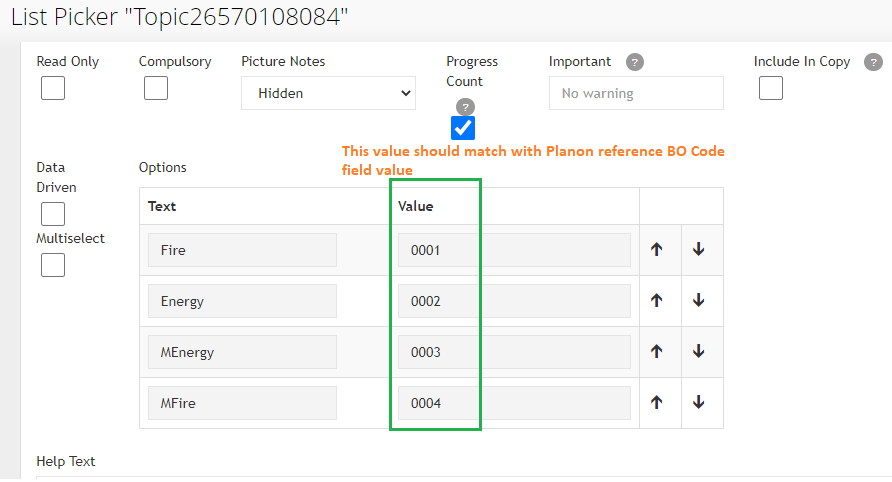
In the list picker question user has to provide correct value map in the options.
The ‘value’ field in the options of list picker question in Mobiess is mapped with Code value of the corresponding reference BO in Planon
Please find the below screenshot for the sample list picker question option values and examples given to handle Topic reference field.
Possible combinations of field types in Planon and question types in Mobiess\
| Mobiess question(s) | Planon field type(s) |
|---|---|
| TextBox, TextArea, Number, Slider, Date, Time, GPS | String |
| Date | Date |
| Date, Time | DateTime |
| Number, Slider | Integer |
| List picker (Single Select) | Reference field, Picklist |
| Checkbox | Boolean |
| Radio Button List V & Radio Button List H | Not Supported |
Push Assessment Definitions
This App contains a business rule that executes when an assessment definition gets created or updated and no questionaire is linked to it. This business rule will create/update a survey template with Draft status in Mobiess.
Technical Details
| Planon BO | Field systemname | Mobiess API Create/Update SurveyTemplate | Comments |
|---|---|---|---|
| Assessment Definition | Description | Name | |
| Assessment Definition | Comment | Description | |
| External BO Link | External ID | Id | |
| Created | Current date time | ||
| Product | Constant value “I” | ||
| Status | Draft / “0” | ||
| TemplateConfig | Refer below string |
TemplateConfig: {SurveyConfig:{ShowSurveyDetails:false,EnableAnswerDetails:false,EnableCorrectiveActions:false,EnableDelete:false,EnableSendToServer:false,EnableAnswerPictures:false}}
Reassign Mobiess Inspection
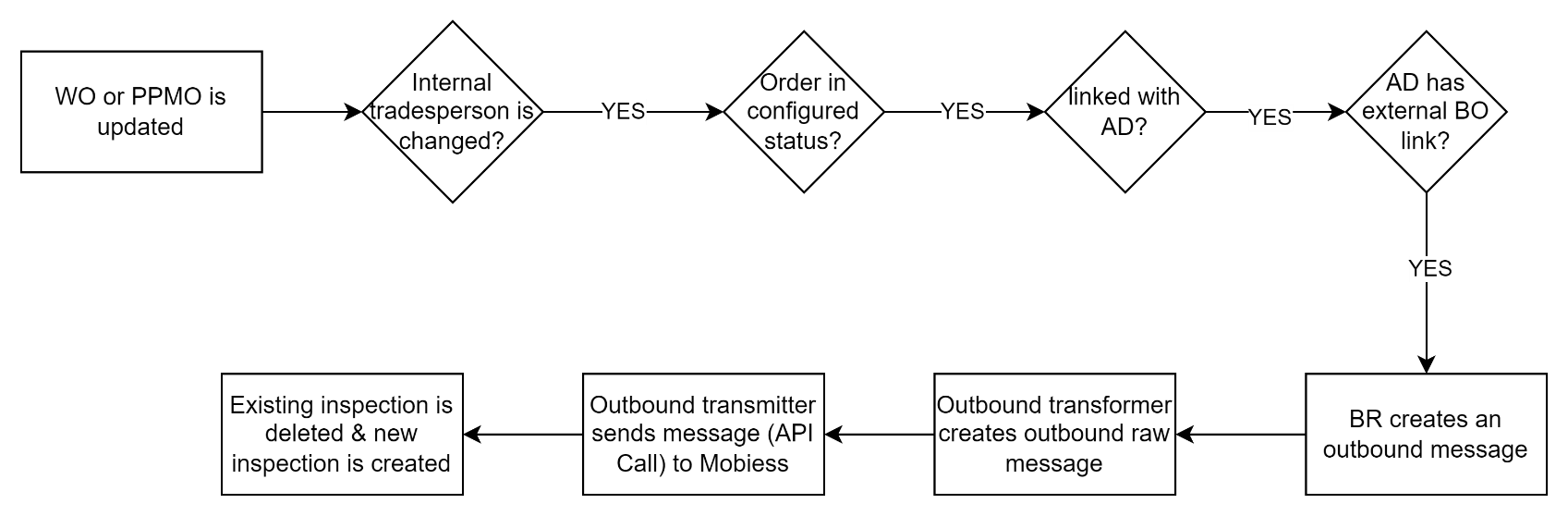
The app comes with a business rule that reassigns the Mobiess inspection when the tradeperson on the order is changed. When the tradeperson on the WorkOrder or PPM Order is changed, the business rule triggers and does following actions
Delete the existing inpsection in Mobiess for the corresponding order
Create a new inspection for the order and the new tradesperson
If the existing inspection is completed in Mobiess, then an error is shown in outbound raw messages that current inspection is already completed in Mobiess.
Component type : Business Rule Component name : planonsoftware.apps.mobiess.connector.businessrule.SurveyHeaderReAssignRule
Flow chart
Note: All the data of the existing inspection is lost.
Cancelling a Mobiess Inspection
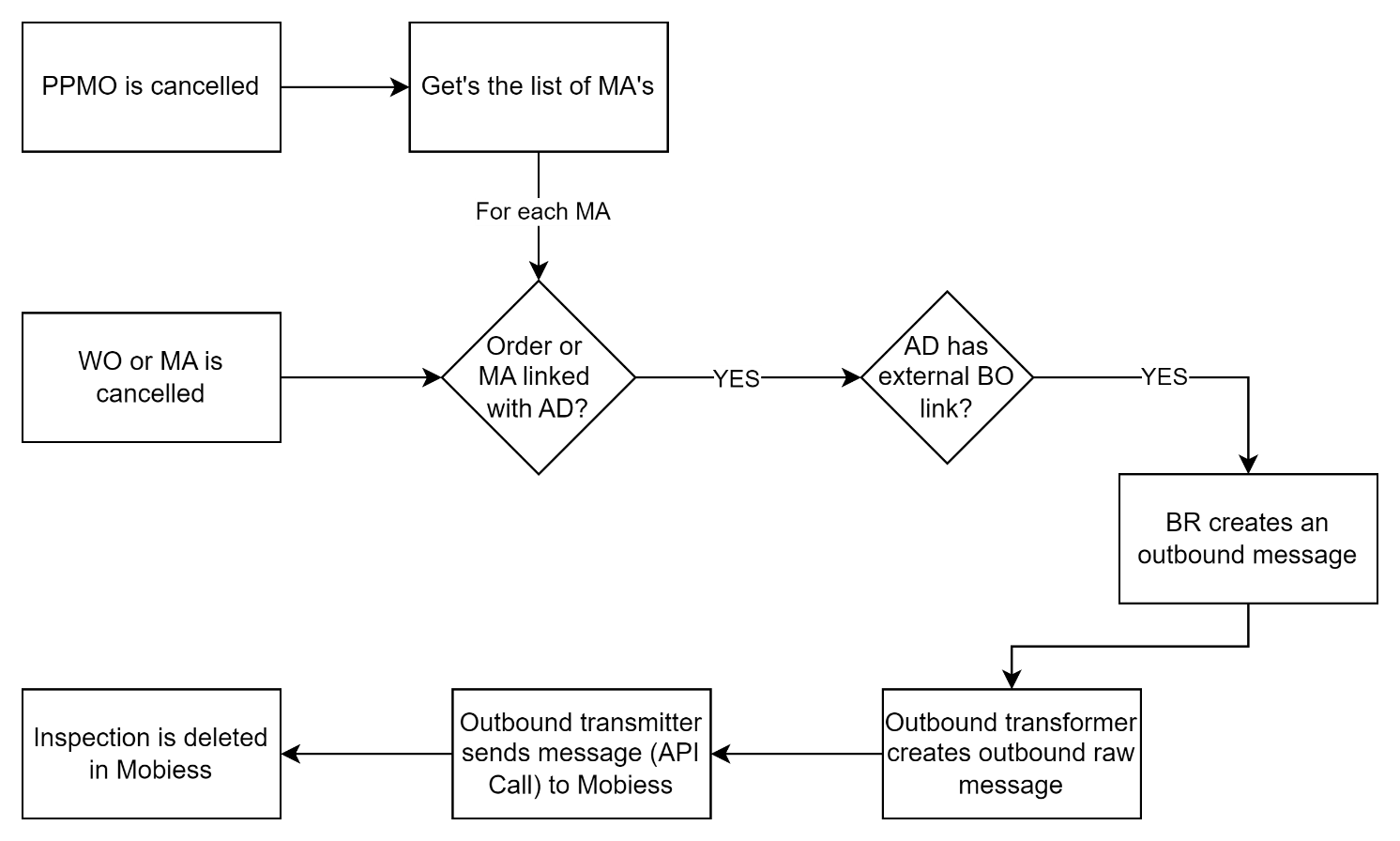
The app comes with a business rule that trigger on cancelling the order. When the status of order is changed to cancelled, the business rules triggers and deletes the inspection in Mobiess if it is not completed. If the inspection is completed, an error is shown on the outbound raw message
Component type : Business Rule Component name : planonsoftware.apps.mobiess.connector.businessrule.SurveyHeaderDeleteRule
Flow chart
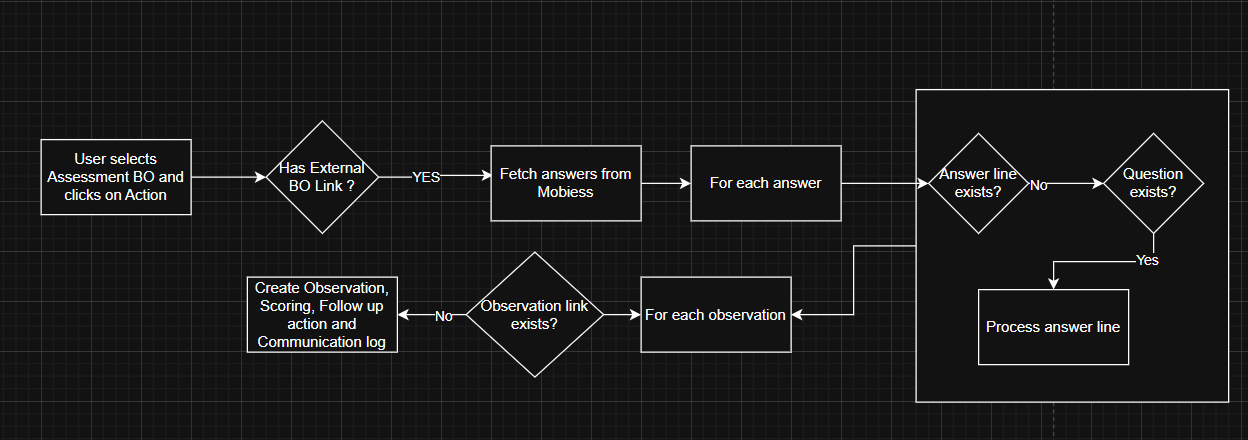
Fetch missing answers
The app comes with a TSI Action on the Assessments BO. When an assessment BO is selected and clicked on the action, the actions checks if the assessment has an external bo link. If there is no link, then this indicates that it is not created from Mobiess.
If there is external bo link, then gets the answers from the Mobiess and checks if answer line is already present in Planon for the corresponding answer. If present, continues to next answer.
If no answer line present, then the app checks if the corresponding question is present. If not present, continue to next answer.
If question is present, then an answer line is created based on question type and answer is provided.
Once all the answer lines are processed, the feature fetches the missing observations, scores, followup actions and comlogs by checking if the external link of the observation. If external link is present, the observation and its corresponding details are skipped.
Component type : TSI Action Component name : planonsoftware.apps.mobiess.connector.tsiaction.FillMissingAnswers